Local analysis with DuckDB
Este conteúdo não está disponível em sua língua ainda.
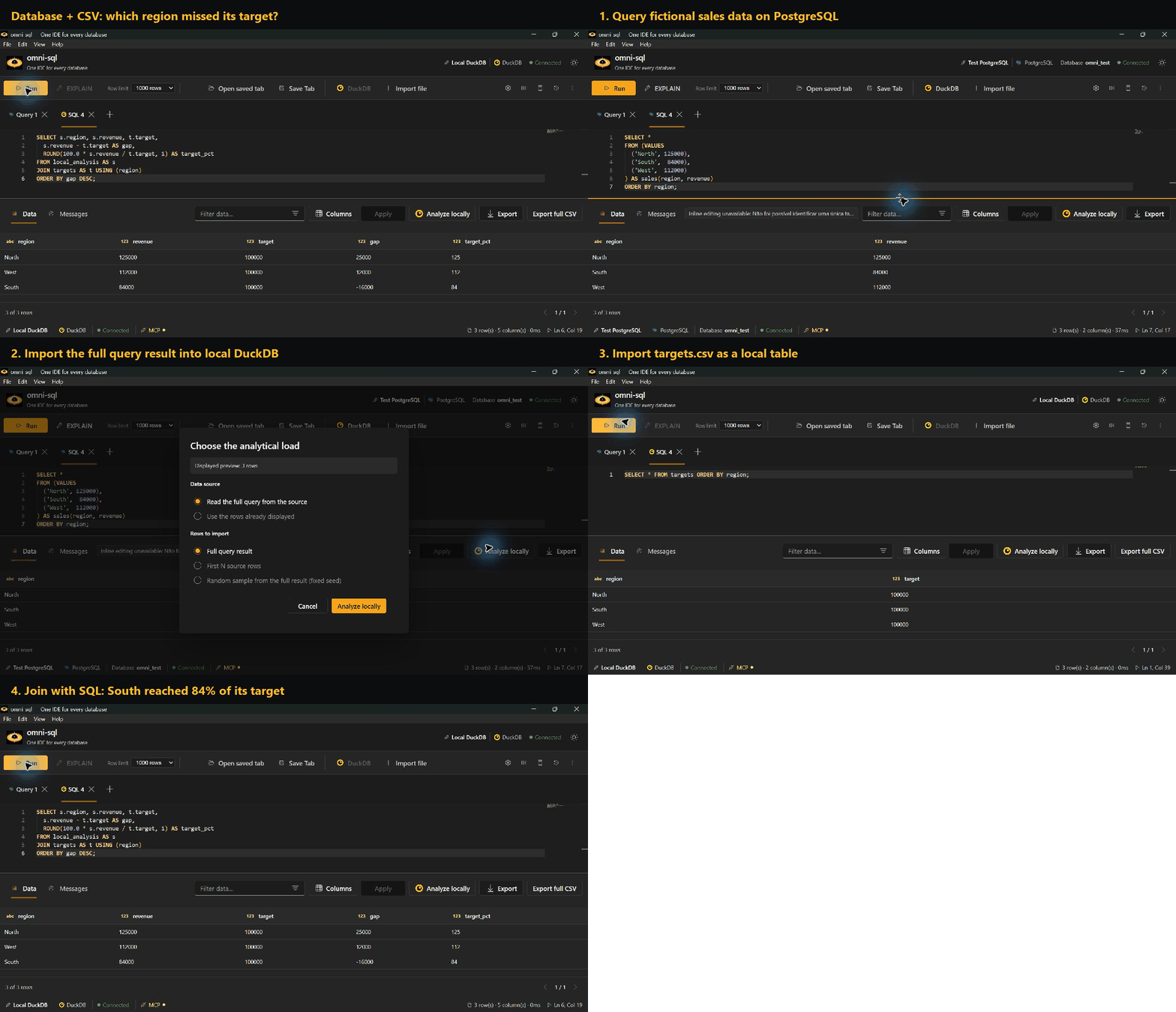
omni-sql embeds DuckDB for local analysis. Import query results, local files and S3 objects as datasets, then query and join them with DuckDB SQL in the Local DuckDB tab or in Analyze locally.
Importing data
Section titled “Importing data”| Source | How |
|---|---|
| Query result | Run a query and choose Analyze locally. A new DuckDB tab opens with the imported data; your original tab keeps its SQL and connection. |
| Local file | Import file accepts CSV, JSON and Parquet. CSV imports show a preview of up to 20 rows and let you pick comma, semicolon, Tab or a custom single-character delimiter. |
| S3 | Create an S3 connection; buckets appear as schemas in Objects. CSV and Parquet work out of the box; Delta, Iceberg and DuckLake depend on DuckDB extensions that may need network access on first use. |
For a query result, choose either the Full query result, which streams the source query to completion within local resource budgets, or a sample (first N rows or a seeded reservoir). The result grid’s row limit is a display preview and does not limit a full import.
DuckLake: configure a catalog on the S3 connection for a bucket or table prefix. The catalog can be a saved PostgreSQL connection or a SQLite/DuckDB file; the longest matching prefix wins when a bucket contains mixed data.
Storage
Section titled “Storage”Datasets are saved in the application’s local.duckdb and survive restarts.
Renaming a dataset changes its SQL name; dropping it removes its table and
metadata. Datasets used only for a session’s joins, temporary result pages and
staging files are cleared when the app exits.
In Analyze locally, Browse all rows materializes a stable temporary result and pages through it 1,000 rows at a time. Editing the SQL or leaving the workspace releases it.
Exporting
Section titled “Exporting”- Export in the result grid writes only the displayed rows.
- Export full CSV (DuckDB editor) and the analytical export (CSV or Parquet) rerun the local query and write every row. CSV exports accept a delimiter, and text starting with a spreadsheet formula prefix is neutralized.
- Full exports write a companion
<result>.omni.jsonwith the coverage and origin of the workspace datasets. Raw SQL is omitted so query literals are not copied to disk. - Direct S3 query results are bounded previews. To export every row, import the object as a dataset first.
Coverage and provenance
Section titled “Coverage and provenance”A full export contains every row of the local query, but it cannot restore rows left out by a sample or a truncated import. Analyze locally warns when a workspace dataset is sampled or truncated.
| Entry point | Recorded coverage | Origin recorded |
|---|---|---|
| Displayed grid | truncated if more rows existed, otherwise complete |
Connection and SQL; the original execution time is unknown |
| Streamed query | complete only after the source signals completion; samples are sampled |
Connection, SQL, and the stream’s start/finish times |
| Local file | complete for the file as read; samples are sampled |
File path |
| S3 object | complete for the registered scan; samples are sampled |
S3 URI |
Different datasets may reflect different source snapshots. An aggregate over a sample describes the sample, not the source.
To compare repeatable samples inside a local query, use DuckDB’s
USING SAMPLE reservoir(1000 ROWS) REPEATABLE (42) on each input subquery.
Sampling both sides of a join can drop matching rows.
Type fidelity
Section titled “Type fidelity”The backend streams rows to DuckDB as newline-delimited JSON batches followed by a completion frame. A missing completion frame, an oversized or malformed frame, or a source disconnect fails the import without publishing a partial dataset. Exact decimals and integers beyond JavaScript’s safe range travel as strings; dates and times travel as text when the driver preserves their precision.
When a driver has already lost precision, the import fails and asks for an explicit cast in the source SQL:
| Source | Problem | Workaround |
|---|---|---|
| SQL Server | Very large DECIMAL/NUMERIC values |
Cast to VARCHAR |
| SQL Server, Oracle | Sub-millisecond timestamps | Cast to text (VARCHAR, or TO_CHAR(col, 'YYYY-MM-DD HH24:MI:SS.FF6') on Oracle) |
| ODBC | Decimal and date/time values of uncertain precision | Cast to text |
MySQL and Oracle return large numeric values as text automatically. Nested DuckDB values appear as JSON in previews, with decimal members kept as strings.