Your databases.
Your files.
One SQL workspace.

Write SQL, explore results, and join data from different sources. A desktop IDE with local DuckDB analysis built in.

Windows · Linux · macOS

Open source · MIT licensed · No account required

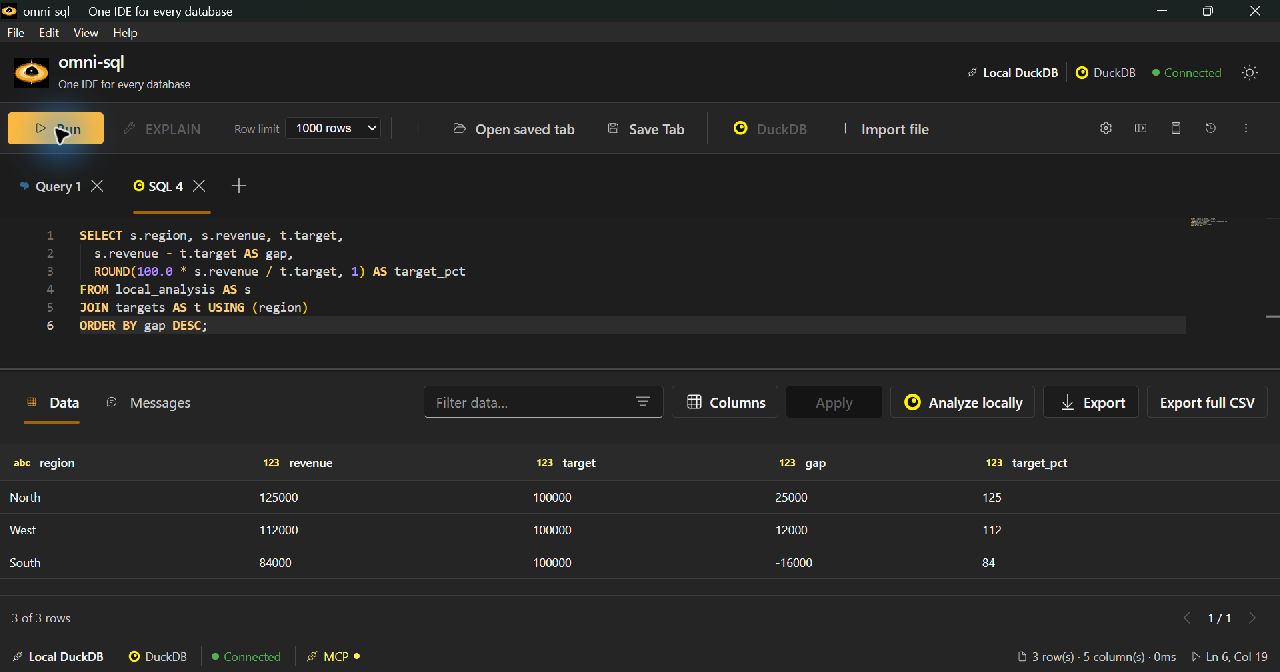
The omni-sql editor running a local SQL join, with the query and three rows of results visible
A real query. Database results + a CSV, joined in local DuckDB.View full sizeScroll sideways to explore the capture.

Connect to your databases

Support & limits

Local DuckDB for files and analysis

Database drivers and connection limits

Experimental JDBC and ODBC connections are also available. Supply a JDBC driver JAR or install a compatible 64-bit ODBC driver.

From the first query
to the final result.

Stay in the same workspace as your work moves from writing SQL to exploring and combining data.

Write SQL with
the context you need.

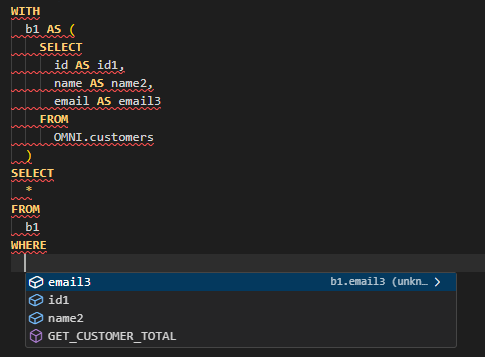
Suggestions follow your database metadata and columns projected by CTEs. Contextual completion works without an LLM.

  • Use dialect quick fixes and /catalog templates.
  • Inspect execution plans where supported.
Explore SQL editing
CTE column suggestions in the omni-sql editor
Column suggestions from the query you are writing.

Get beyond
the result grid.

Filter, sort, and export your results. Edit eligible relational rows, or bring the query output into local analysis.

  • Browse all materialized rows in local analysis.
  • Export the full local query output.
Explore results and exports
Row editing requirements

Relational row editing requires primary-key checks to establish a safe update path.

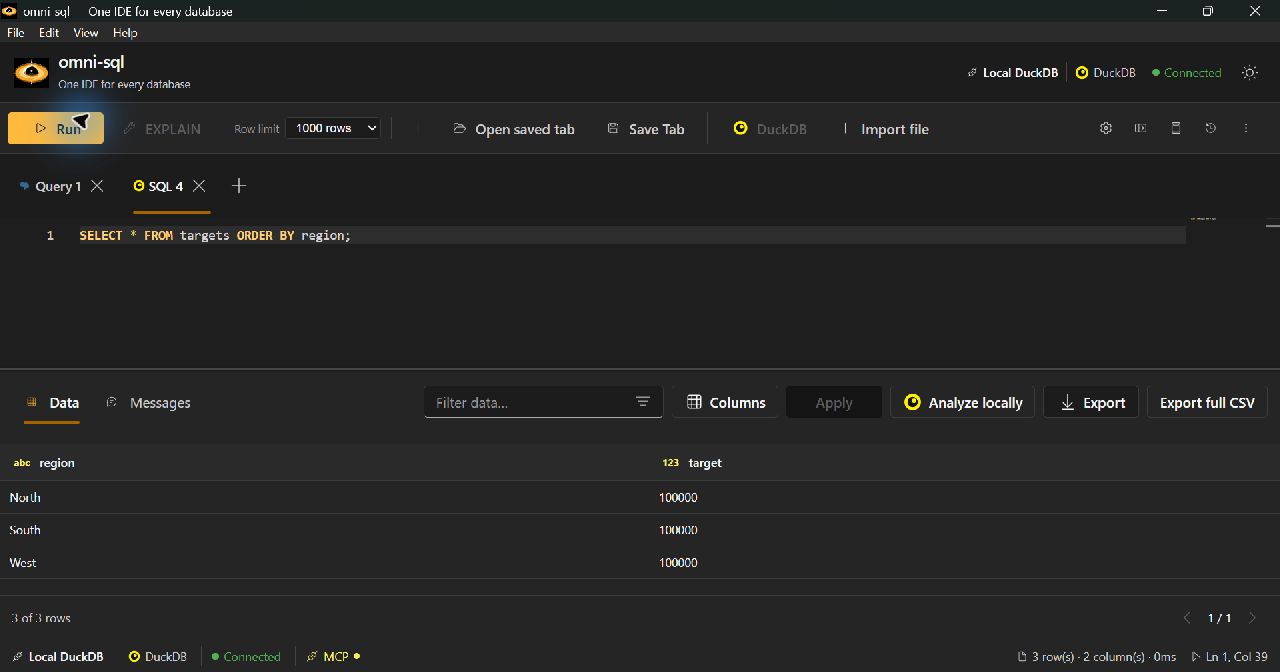
The results toolbar and local targets dataset in omni-sql
Query results, ready to inspect and use.

The database has sales.
The CSV has targets.

Bring them together without uploading the file to your source database.

  1. Run the sales query and choose Analyze locally.
  2. Import targets.csv into the local workspace.
  3. Join the datasets with SQL and export the answer.
Try this demo
PostgreSQL resulttargets.csvLocal DuckDB
SELECT s.region, s.revenue, t.target,
       ROUND(100.0 * s.revenue / t.target)
         AS target_pct
FROM local_analysis AS s
JOIN targets AS t USING (region);
Illustrative SQL · fictional demo data
RegionRevenueTargetReached
North125,000100,000125%
West112,000100,000112%
South84,000100,00084%
South reached 84% of its target.
Import, export, and local storage details

Preview before importing

Preview up to 20 CSV rows and choose comma, semicolon, Tab, or a custom delimiter. CSV exports also support a chosen delimiter.

Keep full loads and samples distinct

Choose a full query result or a sample. Full loads are subject to local resource budgets; samples retain only selected rows. A full export includes the rows in your imported datasets and cannot restore omitted rows.

Local DuckDB datasets persist after restart. Full analytical exports include a companion provenance file. Import coverage and provenance.

More sources.
Same workspace.

Keep relational data, documents, and cloud files within reach.

MongoDB, with room for documents.

Switch between Table and Documents. Expand objects and arrays while preserving BSON values.

MongoDB query and editing limits

Use native Extended JSON queries and explicit writes, or read-only SQL with supported /mongo conversion. Document view itself is read-only.

MongoDB guide

Take your analysis to S3.

Browse and query supported S3 objects, then import them locally for full analytical exports.

S3 format support

S3 CSV imports use automatic delimiter detection. Additional table formats depend on available DuckDB extensions.

S3 and local analysis guide

An AI client proposes.
You stay in control.

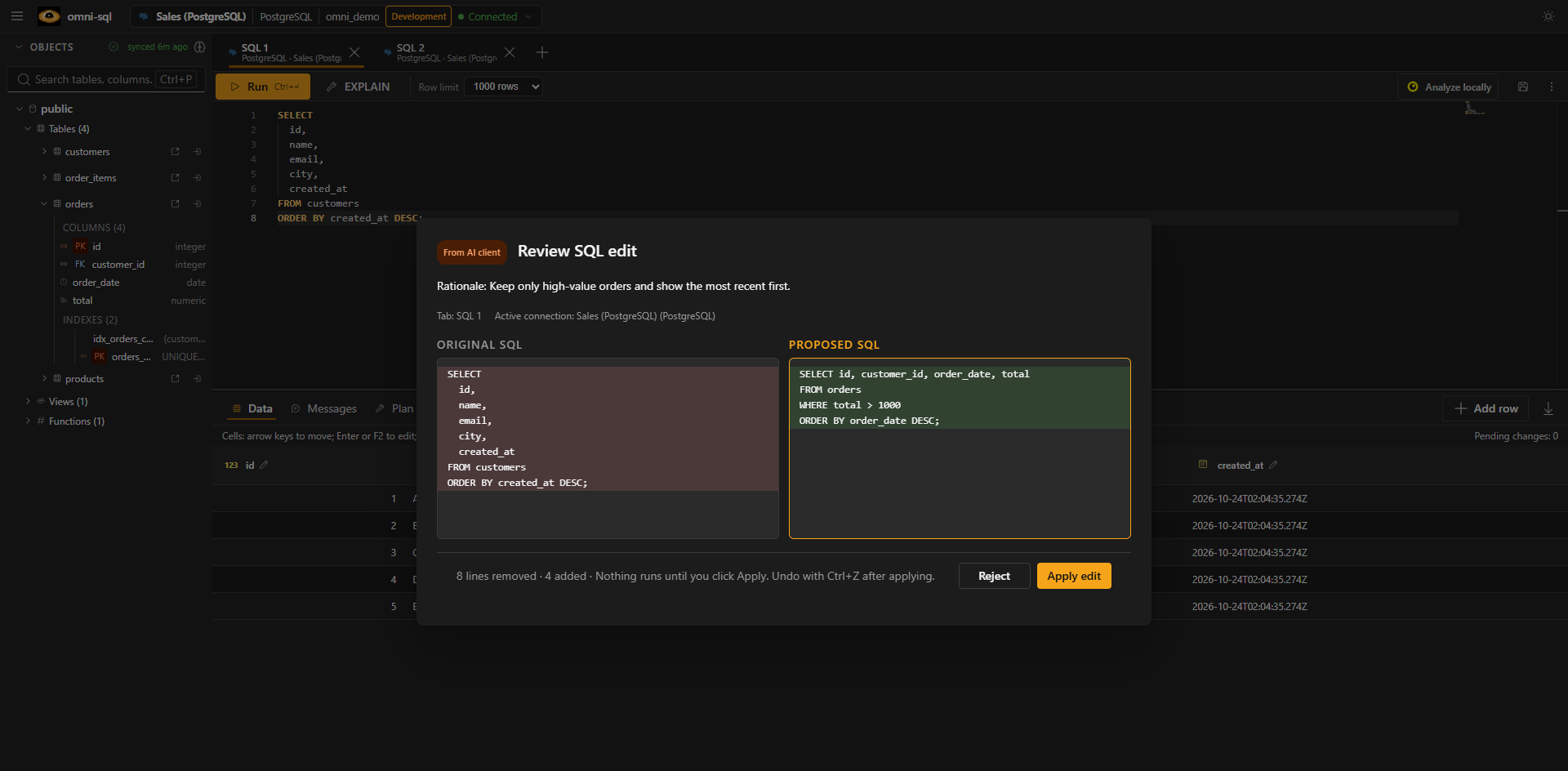
Connect compatible AI clients to the local MCP server. Review proposed SQL edits and approve execution in the desktop.

Set up MCP
MCP connection details

Inspect schema and plans through compatible clients. Use STDIO or optional authenticated loopback HTTP.

SQL edit review in omni-sql, showing original SQL, proposed SQL, and Reject and Apply edit controls
Review the change before applying it.Scroll sideways to inspect the proposed change.

Your next query
starts here.

Install omni-sql, connect a database or open a CSV or Parquet file, and start writing SQL.

Opens GitHub Releases. Choose the file for your system under Assets.

  • Windows x64.exe installer · winget install cccadet.omni-sql
  • Debian / Ubuntu amd64.deb package
  • macOS 15+Apple Silicon / Intel · .dmg
Installation notes

Node.js and Java are bundled. Native database connections need no separate database client. macOS packages use an ad-hoc signature; read the first-launch instructions.

Early-stage software. Try it with development data and share your feedback.